Smart Audio Converter 3.3
Updated on 18 Jul 2011
By Anthony Buckner
By Anthony Buckner
Specifications
License:
Freeware
Updated:
Downloads:
1255
Platform:
Windows All
Publisher:
Smart Soft(more)
Website:
User Reviews:
Other versions:
4.1
Do you like
Smart Audio Converter?
FindMySoft Editor's Review
Smart Audio Converter Standard – Windows Utility to Convert Audio Files
The functionality some applications provide cannot be guessed by simply taking a look at that application’s name. Take the Mozilla-developed Firefox browser. You couldn’t possibly tell what Firefox is by simply looking at the application’s name; you couldn’t tell it is a properly good, fast and secure web browser.
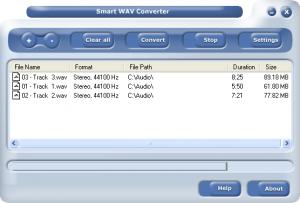
The functionality some other applications provide can easily be guessed by simply taking a look at that application’s name. This is definitely the case with the SmartSoft-developed application, the aptly named Smart Audio Converter Standard. As the application’s name so adequately points out, this is a utility that allows you to convert audio files from one format to another.
Here are the parts that are not immediately obvious from the application’s name:
- Smart Audio Converter Standard provides support for numerous audio formats, including WMA, MP3, WAV and OGG.
- Batch conversion is supported, which means you can convert multiple audio files at once.
- The conversion takes places at speedy pace.
- The application’s interface is quite simple to figure out.
Before you go get Smart Audio Converter Standard and put it to the test, take a look at the following technical details:
Download – the download weighs in at 5.4MB. On a high-speed internet connection, it should not take long to get Smart Audio Converter Standard off the web and onto your computer.
Supported OS – at the time of writing this and according to the developer, Smart Audio Converter Standard provides support for Windows 98, 2000, Windows XP, Windows Vista and Windows 7.
Limitations – the trial version is not time-limited, but it only converts 60% of the source file.
Please note there are SmartSoft has two Smart Audio Converter versions to offer: Smart Audio Converter Standard and Smart Audio Converter Pro.
Pros
Cons
About SmartSoft
Founded back in 2001 and headquartered in Bulgaria, SmartSoft specializes in the development of home and business software applications. As SmartSoft explained, it takes customer feedback seriously and implements that feedback into the development process of its applications.
Additional details on SmartSoft are available here.
Additional details on Smart Audio Converter are available here.
The functionality some other applications provide can easily be guessed by simply taking a look at that application’s name. This is definitely the case with the SmartSoft-developed application, the aptly named Smart Audio Converter Standard. As the application’s name so adequately points out, this is a utility that allows you to convert audio files from one format to another.
Here are the parts that are not immediately obvious from the application’s name:
- Smart Audio Converter Standard provides support for numerous audio formats, including WMA, MP3, WAV and OGG.
- Batch conversion is supported, which means you can convert multiple audio files at once.
- The conversion takes places at speedy pace.
- The application’s interface is quite simple to figure out.
Before you go get Smart Audio Converter Standard and put it to the test, take a look at the following technical details:
Download – the download weighs in at 5.4MB. On a high-speed internet connection, it should not take long to get Smart Audio Converter Standard off the web and onto your computer.
Supported OS – at the time of writing this and according to the developer, Smart Audio Converter Standard provides support for Windows 98, 2000, Windows XP, Windows Vista and Windows 7.
Limitations – the trial version is not time-limited, but it only converts 60% of the source file.
Please note there are SmartSoft has two Smart Audio Converter versions to offer: Smart Audio Converter Standard and Smart Audio Converter Pro.
Pros
- Easy to use
- Provides support for numerous audio formats
- Batch conversion
Cons
- The trial version converts only 60% of the source file
About SmartSoft
Founded back in 2001 and headquartered in Bulgaria, SmartSoft specializes in the development of home and business software applications. As SmartSoft explained, it takes customer feedback seriously and implements that feedback into the development process of its applications.
Additional details on SmartSoft are available here.
Additional details on Smart Audio Converter are available here.
Do you like
Smart Audio Converter?
Advertising
Popular News
Popular micro-blogging and social networking service Twitter has made an announcement that came as a shock for advocates of online freedom. Twitter announced that as it continues to grow at
We all start the year with resolutions, such as “this year I’m going to more carefully watch what I eat”, or “this year I will try to be less stressed”. Most times we discard these resolutions just as easily as
Smart Audio Converter Awards
Smart Audio Converter Editor's Review Rating
Smart Audio Converter has been reviewed by George Norman on
25 Oct 2010. Based on the user interface, features and complexity, Findmysoft has rated
Smart Audio Converter
4
out of 5 stars, naming it ExcellentYour Rating
Top Downloads
2.
Opera5.
Trillian8.
AIM9.
Skype10.
Ad-Aware12.
Nero13.
Google Earth14.
Picasa15.
Winamp16.
iTunes17.
RealPlayer18.
uTorrent19.
eMule20.
WinRAR21.
BitComet22.
WinZip23.
Shareaza24.
CCleaner25.
Recuva26.
Tweak UI27.
CuteFTP Home29.
Adobe Reader30.
NewsPiperBecome A Fan!
Link To Us!
Smart Audio Converter
HTML Linking Code
HTML Linking Code